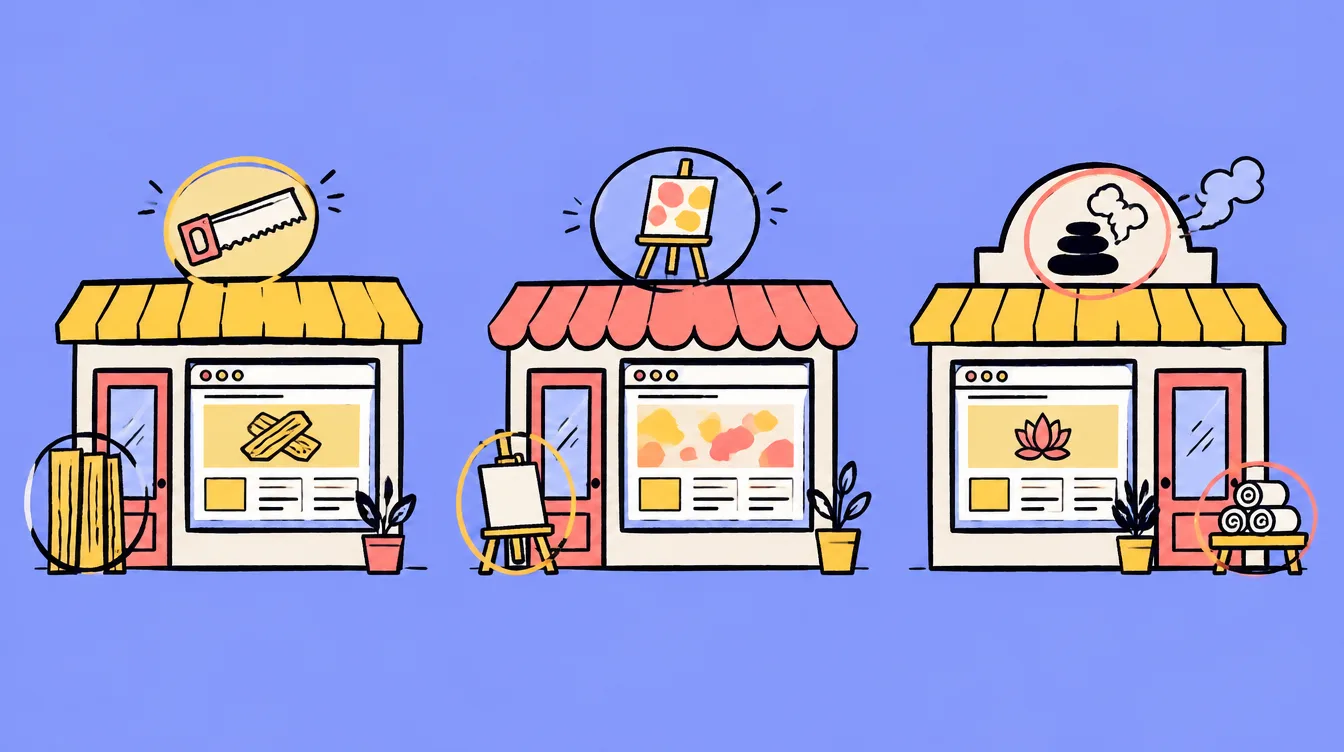
A *custo CRM** is client and job management software built for one company: its steps, its words, its screens. The alternative is an off-the-shelf CRM (HubSpot, Pipedrive and the rest) that you rent by the month and bend to your needs as best you can.
I'm Pablo, a web developer based in the Ain, in France. I build custom CRMs for tradespeople and small businesses, with one simple idea: the main screen isn't a table, it's your workshop, dining room or warehouse, shown in 3D. This article explains when custom is worth it, what it costs, and lets you try a demo.
A CRM (customer relationship management) is where a business keeps its clients, requests, quotes and what's left to do for each. A custom CRM does the same job, but it is written for you: it starts from your working day, not from a feature list designed for thousands of different companies.
In practice, three things change. The words are yours (a garage talks about lifts and number plates, a restaurant about tables and covers). The steps are yours (received, diagnosis, in repair, waiting for parts, ready to collect). And nothing is superfluous: no menu that nobody opens.
There are three types of CRM: operational, analytical and collaborative. Most small businesses mainly need the first.
- Operational CRM: for everyday work. Client records, open jobs, follow-ups, quotes, appointments. This is the one a tradesperson or small business actually uses.
- Analytical CRM: for understanding. Revenue per month, types of request, average lead times. Useful once you have enough jobs for the numbers to mean something.
- Collaborative CRM: for sharing information between reception, the workshop, sales and sometimes the client.
A custom CRM can mix all three. The demo below is mostly operational, with four indicators calculated automatically from the jobs.
An off-the-shelf CRM fits when your business looks like everyone else's: you sell, you follow up, you sign. A custom CRM becomes interesting when your work revolves around something standard software can't show: bays, vehicles, building sites, rooms, machines.
- Choose off-the-shelf if: you're starting out, there are one or two of you, your needs are classic (contacts, quotes, follow-ups) and you're happy to adapt to the tool.
- Look at custom if: the team has stopped opening the current tool, you keep a spreadsheet on the side "because it's simpler", you pay for features you don't use, or your work has a sense of place (what is where, since when, and what's left to do).
- In between: many CRMs can be customised (fields, steps, automations). That's often enough, and cheaper. I'll tell you if that's your case.
A custom CRM generally costs several thousand euros, paid once, whereas an off-the-shelf CRM is paid per user per month. These are the published French prices I noted in Google's results on 12 November 2026.
- Off-the-shelf subscription: one French vendor lists €15 to €40 per user per month. For five people, that's €75 to €200 a month, or €900 to €2,400 a year, every year.
- Agency-built custom CRM: one agency quotes €5,000 to €25,000 depending on the project. A specialist site lists "from €3,000".
- With me: quoted per project. The price depends on the number of screens, the business rules, the import of your existing data and whether there is a 3D view. I'd rather give a fair figure after a call than a range that means nothing.
To compare fairly, count over several years: a subscription never stops and grows with the team, while a build is paid upfront and then costs hosting and upkeep. My advice on reading a proposal is in how to read a website quote, and it applies to software too.
A tradesperson rarely needs a prospecting tool. They need to know where each job stands, what's blocked and what has to go out today. That is exactly what a view of the workplace shows.
- Garage: which vehicle is on which lift, which is waiting for a part, which is ready to collect, and for how much.
- Repair workshop (bikes, motorbikes, appliances): each workstation, each item and its promised date.
- Building and landscaping: sites in progress, teams assigned, quotes awaiting an answer.
- Restaurant: the floor plan, occupied tables, bookings for the service.
- Salon, practice, vet clinic: the chairs or rooms, and the current case in each.
For a small business, the best CRM is the one the team opens every morning. Comparison articles rank software by number of features; on the ground the opposite works: few screens, the right ones.
- One view for everyone: reception, the workshop and the owner look at the same thing, up to date.
- No double entry: information typed once appears in the record, the list and the indicators.
- Figures that calculate themselves: the value of open quotes or the number of finished jobs isn't copied by hand.
- Your data stays yours: you can export it, and the software doesn't stop if a vendor changes its prices.
- Usable on a phone: in a workshop, nobody sits at a desk.
A 3D interface is useful when your work happens in a place and the morning question is "where does everything stand?". It's pointless if your work is a list of contacts to call: a table does that better.
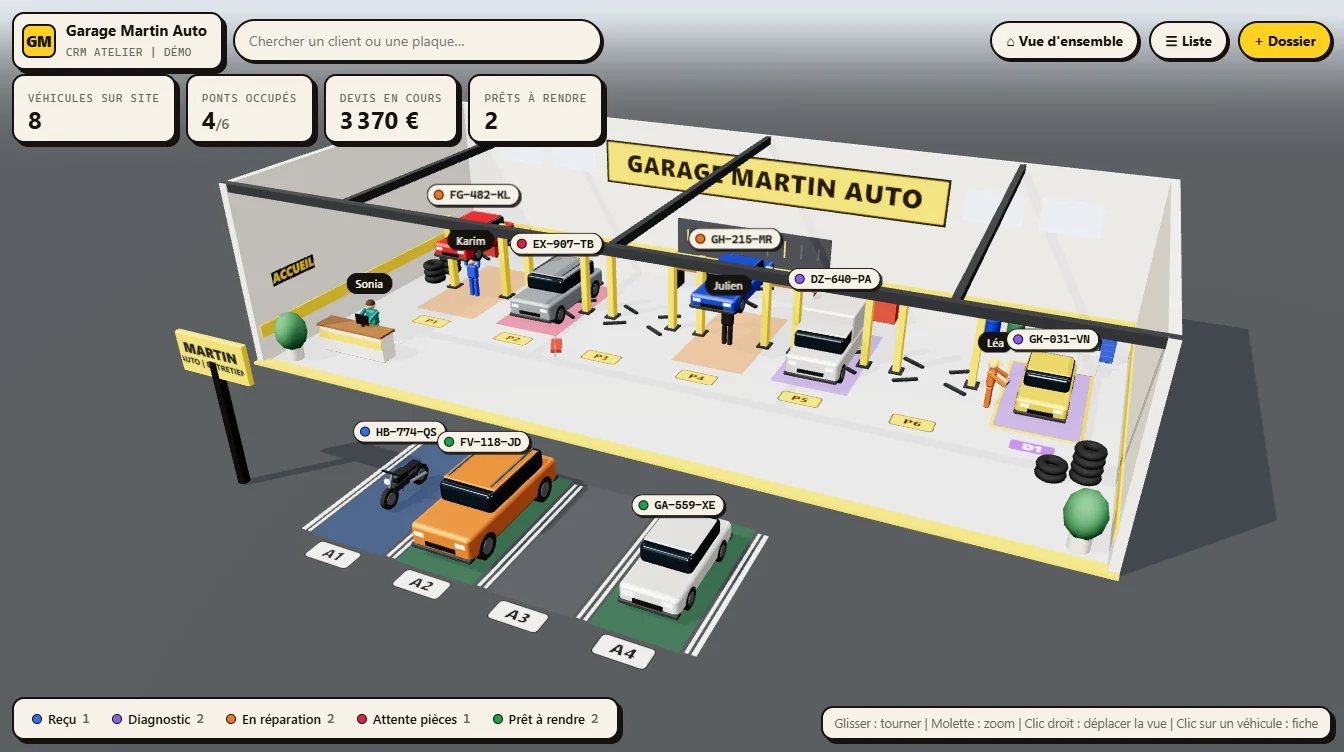
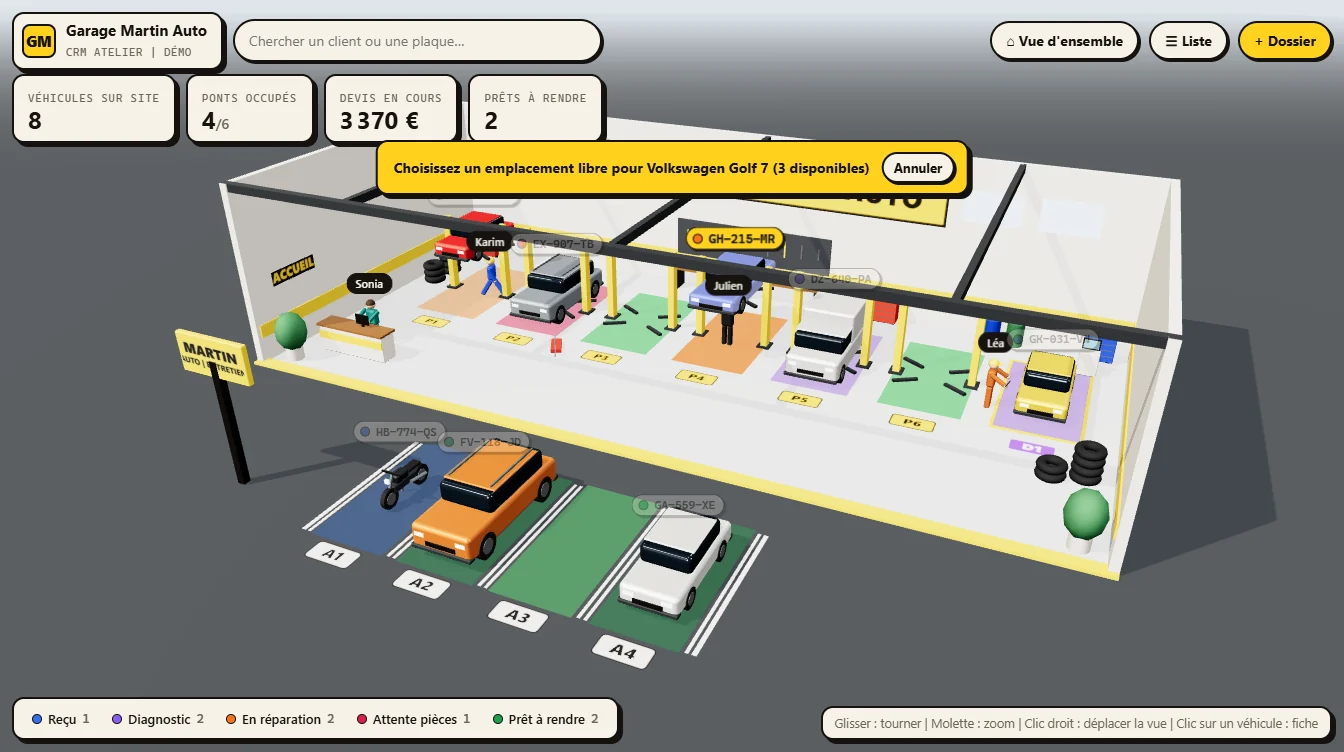
What 3D brings is instant reading. In the demo you see in one second that four lifts out of six are in use, that one car is raised because it's being repaired and that two vehicles are waiting for their owners in the car park. No rows to read. And a tool that's pleasant to look at is a tool the team opens.
3D replaces nothing: the list, filters, search and records are all still there. It's the same technology as my 3D websites, applied to a working tool.
I built a demo for a fictional garage, Garage Martin Auto. The clients, plates and amounts are made up for the example; the way it works is real. You can open it and change everything: nothing is sent anywhere, changes stay in your browser. The interface is in French.
- The bays: six lifts, one diagnosis bay and four waiting spaces, numbered on the floor.
- The statuses: received, diagnosis, in repair, waiting for parts, ready to collect. One colour each.
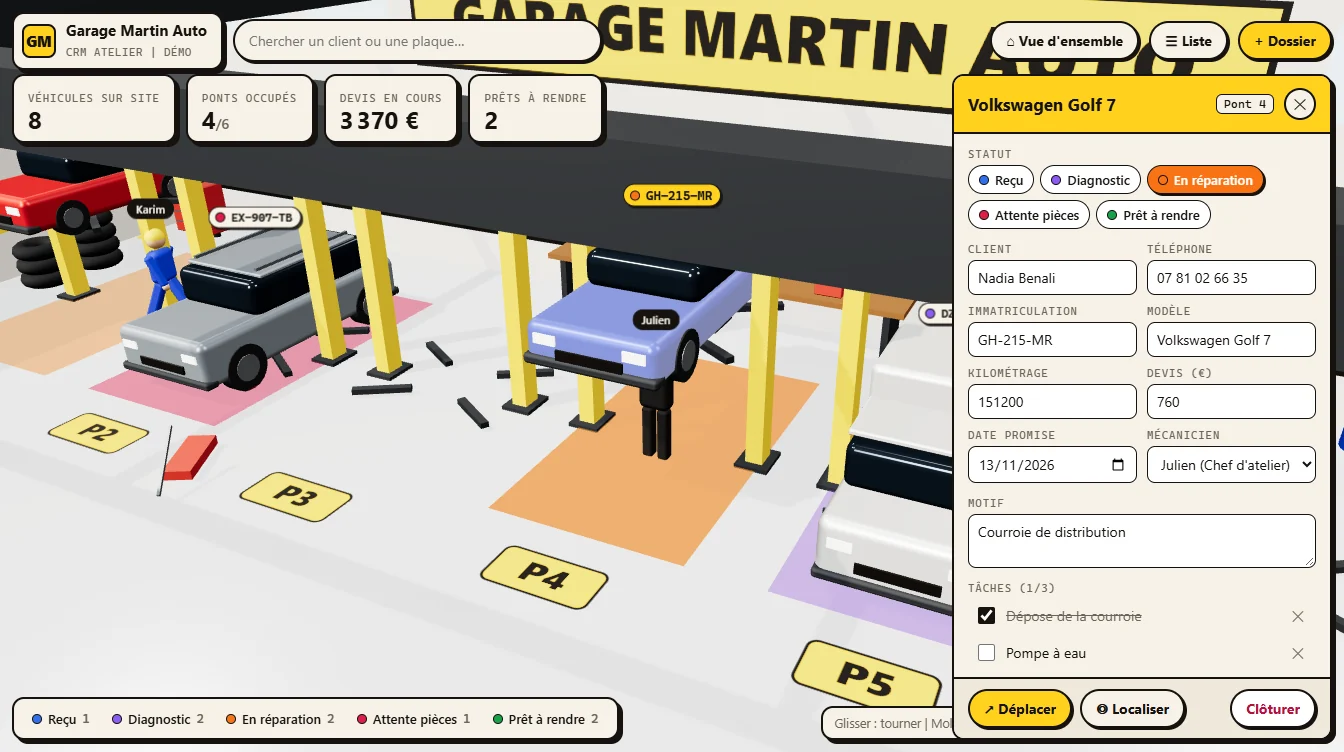
- The record: client, phone, plate, mileage, reason, task checklist, quote, promised date, mechanic and history.
- The team: the mechanic stands under the car being repaired, or next to it with a tablet during a diagnosis.
- The indicators: vehicles on site, lifts in use, open quotes, ready to collect. They are calculated from the same data as the scene.
- Search: type a name or a plate and the camera finds the vehicle.
Custom software is built in five steps: understand the work, design the screens, develop a first version, test it with the team, then put it into service and maintain it.
- The first call: you describe a normal day. Who does what, on which tool, and what wastes time.
- The questions: the bays, what you track, the steps, the record's fields, the team, the four figures to see at all times. If you have photos of the premises, I use them for layout and colours.
- The first version: a clickable demo like the garage one, with your words and your steps. We correct on that, not on a document.
- The real tool: accounts, backup, permissions, import of your data, links to invoicing or a calendar if needed.
- Going live: a walkthrough with the team, then upkeep and changes.
Unsure between a freelancer, an agency and a ready-made tool? The criteria are the same as for a website, and I go through them in freelancer, agency or website builder. If what you need is a hand-coded site or app, see my custom development page.
A CRM is well used when each piece of information is entered once, when it arrives. Three habits are enough.
- Create the job on arrival: as soon as the client drops off the vehicle or calls, not from memory in the evening.
- Change the status at the right moment: that one gesture keeps the indicators current and avoids "where are we with that one?".
- Look at the overview in the morning: what's ready to collect, what's waiting for a part, what's promised for today.
Published French agency prices range from €3,000 to €25,000 depending on the project (noted on 12 November 2026). With me it is quoted per project: the price depends on the number of screens, the business rules, the import of your data and the 3D view.
Operational CRM (everyday work: records, jobs, follow-ups), analytical CRM (figures to understand the business) and collaborative CRM (sharing information between teams). A small business mainly needs the first.
A simple tool, usable on a phone, that shows where each job stands: what's in progress, what's blocked, what has to go out today. Off-the-shelf software is often enough to start; custom becomes useful when the work revolves around a place (lifts, workstations, sites).
A subscription is cheaper at the start (one vendor lists €15 to €40 per user per month) but is paid every year and grows with the team. Custom is paid upfront, then costs hosting and upkeep. Compare over several years.
To see the state of the workplace at a glance: which bays are in use, what step each job is at, what is ready. It complements the list and the records, it doesn't replace them. It is pointless if the work is just a list of contacts.
Yes, to start: one row per client and one column per step. The limits come when several people fill it in, when you need a history or an overview of the workshop.
Yes. The software is developed for you, your data can be exported and the tool doesn't depend on a vendor's price changes.